Oracle
This page describes how to set up a new PowerTSM database on an existing Oracle instance and how to update an existing PowerTSM database to a more recent version using SQL*Plus.
Prerequisites
Section titled “Prerequisites”A list of supported Oracle versions can be found here: System Requirements.
To run the scripts, Oracle SQL*Plus is required. This tool can be downloaded for your platform from the Oracle websites directly.
A full installation of the Oracle Client is not necessary. All PowerTSM components include their own copy of Oracle’s portable driver libraries.
Installation
Section titled “Installation”This section describes how to set up a fresh PowerTSM database on an existing Oracle instance.
Preparing the Installation Scripts
Section titled “Preparing the Installation Scripts”Basic Components
Section titled “Basic Components”The file install.sql under ...\Database Scripts\Oracle represents the main script. It contains several sections for different components of the PowerTSM database system. Commenting-in or out individual sections determines which of these components are installed when executing the scripts.
For a fresh install, the sections
Creating HAKOM tablespaces and user,Creating HAKOM ACL objects,Creating HAKOM TSM objectsandCreating HAKOM Framework objects
should be activated (remove the -- preceding each relevant line).
In the next step, each component enabled in the previous step must be configured. Comment-in the initial scripts from version 3.8.0 up to the latest version in the respective SQL scripts.
| Component | Script |
|---|---|
| ACL (User Management and Access Control) | HAKOM_ACL_Update.sql |
| Time Series Storage | HAKOM_Framework_Update.sql |
| Logging | HAKOM_Protocol_Update.sql |
| Additional Storage required by the PowerTSM App | HAKOM_TSM_Update.sql |
Configuring install.ini
Section titled “Configuring install.ini”Finally, under ...\Database Scripts\Oracle the file install.ini must be configured. Using a text editor, assign values to the defined variables that are used in the scripts. The values must be enclosed in single quotes (' ').
Executing the Installation Scripts
Section titled “Executing the Installation Scripts”-
Go to the local script directory and set the parameters for SQL*Plus as follows:
SET ORACLE_HOME= (Oracle client path)CHCP 65001 (UTF-8 code page required for UTF-8 scripts) -
Start SQL*Plus in the folder with the scripts:
sqlplus /nolog -
Run
install.sql:@install.sql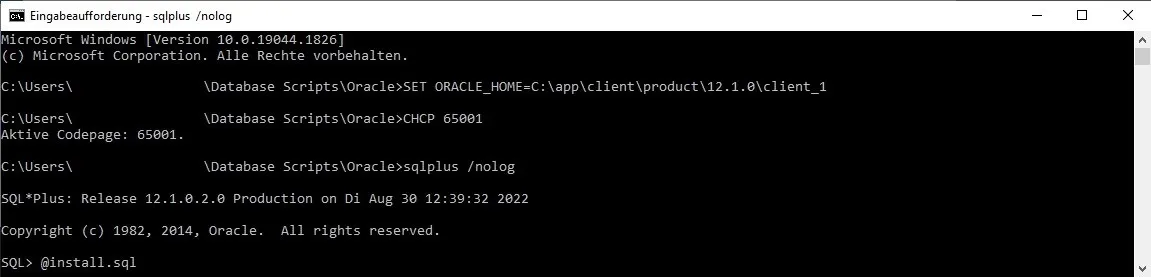
Compressed Storage
Section titled “Compressed Storage”In order to view compressed data on the Database directly, Java is required on the Database server, and has to be activated:
loadjava -user [Schema]/[Password][@Database] commons-codec-1.6.jarThis is optional and in no way required for using and interacting with compressed time series through PowerTSM.
Update
Section titled “Update”This section describes how to upgrade an existing database which already has some PowerTSM components installed to a more recent version.
Preparation
Section titled “Preparation”At first the current database version of ACL, FW, Protocol and TSM objects has to be checked. To do that, check the entries in the table DBVERSION. The interpretation of the entries is explained in the following example.
Reading the version from the DBVERSION table
Section titled “ Reading the version from the DBVERSION table”Content of the DBVERSION table:
| ID | NAME | DESCRIPTION | CREATIONDATE | REVISION | PATCH | MAJOR | MINOR |
|---|---|---|---|---|---|---|---|
| 1 | HAKOM TSM | - | 2022-07-01 | 5 | 0 | 3 | 8 |
| 2 | HAKOM Framework | - | 2022-07-01 | 0 | 0 | 3 | 9 |
Interpretation:
HAKOM TSM: version 3.8.5.0HAKOM Framework: version 3.9.0.0
Manual Check Scripts
Section titled “Manual Check Scripts”Before the update scripts are installed, it is important to check if manual check scripts have to be installed. You can find them under ...\Database Scripts\Oracle\V3.x.x\V3.x.x.x\_manual check script and, if necessary, run them manually and follow the instructions within the scripts.
Preparing the Update Scripts
Section titled “Preparing the Update Scripts”Basic Components
Section titled “Basic Components”The file install.sql under ...\Database Scripts\Oracle represents the main script. Commenting in or out determines which sub-scripts are called.
In install.sql the sections Create HAKOM-ACL Objects, Create HAKOM-TSM Objects and Create HAKOM-Framework Objects must be activated.
Comment all lines in the update scripts up to (and including) the currently installed version.
Update from 3.8.7 to 3.9.2
Section titled “ Update from 3.8.7 to 3.9.2”| Component | Script |
|---|---|
| ACL (User Management and Access Control) | HAKOM_ACL_Update.sql |
| Time Series Storage | HAKOM_Framework_Update.sql |
| Logging | HAKOM_Protocol_Update.sql |
| Additional Storage required by the PowerTSM App | HAKOM_TSM_Update.sql |
Configuring install.ini
Section titled “Configuring install.ini”Finally, under ...\Database Scripts\Oracle the file install.ini must be configured. Using a text editor, assign values to the defined variables which will then be used in the other scripts. The values must be enclosed in single quotes (' ').
Executing the Update Scripts
Section titled “Executing the Update Scripts”-
Go to the local script directory and set the following environment variables:
SET ORACLE_HOME= (Oracle client path)CHCP 65001 (UTF-8 code page required for UTF-8 scripts) -
Start SQL*Plus in the folder with the FW scripts:
sqlplus /nolog -
Run
install.sql:@install.sql